Review Comments (0) Screenshots (5) Questions & Answers (0) Votes (5) Awards (17) Wiki  
-Please log in to rate
4.6 4.6/5 (5)
-FSPro Labs
-4.8
-www.fsprolabs.com
-Shareware
-19.95$  Purchase
- 964 people
Download Lock My PC

1.5 MBDownloaded 468 times


Review

This review applies to version 4.7 The latest version of this software will soon be reviewed by our informers.

Lock My PC can lock your computer completely in a second. You can use a custom hotkey combination to lock your computer when ever you want. Lock My PC can be used for home or office use because of it's simple interface and powerful locking system.
This application can be very useful, If you are working on your computer in office and you have to leave your computer desk because your boss is calling you. In the mean time when you are not at your desk, someone can steal your important data or see your private information or what you were doing on your computer. Because usb pen drives have make data traveling so faster and easier, so it is not difficult for someone to copy all your data in just 20 seconds. For experts, 20 seconds are double than they need to copy your private data. So the best way to keep your data and important information safe is to use Lock My PC.

Once you have locked your PC using any hotkey, no one can access to your computer without password. It is impossible to take a screen shot even when your computer is locked with Lock My PC.

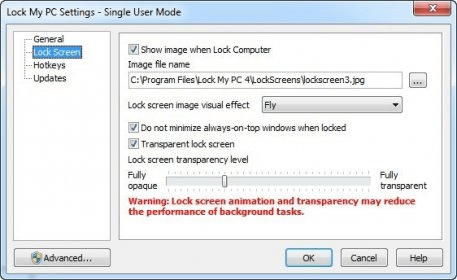
In addition you can see unsuccessful attempts to your PC and lock all CD-ROM drives that stops the use of autorun and bootable CD's. You can apply any image to screen when computer is locked using Lock My PC.

Lock My PC can automatically lock your PC at every start up, after system stands By or after desired minutes of inactivity. Shortly saying, Lock My PC is one of the best access control softwares and a must have tool.

What's new in this release:
. Fixed a security flaw that allowed to unblock USB keyboard at startup lock.
. Fixed minor bugs.
Advantages
  • locks your PC completely in a second.
Disadvantages
  • None

Reviewed by: Jasminder Singh

Reviewer rating: Editor's rating 5

Screenshots

Adjusting transparency Adjusting transparency Hotkeys to lock your PC in a second Hotkeys to lock your PC in... General settings General settings Taskbar options Taskbar options
All 5 screenshots

Latest comments


There are no comments, be the first one!
Add new comment
Tag cloud
Download siClient

Email Address:

Password:

Register now »

Forgot password?

Copyright © 2009, Informer Technologies, Inc. About| Privacy and terms| Help| Feedback